Kirlian Terminal Music Player
A beautiful and fast music player, right in your Terminal. It plays your local music from the keyboard, offline, and keeps your place in the record. No account needed.
curl -fsSL https://github.com/lubizart1/Kirlian-terminal/releases/latest/download/install.sh | sh- macOS and Linux
- Sets up uv, and mpv on macOS
- Checks the published checksum
- Never uses sudo
Then run kirlian. On Linux the installer prints the command to install mpv.
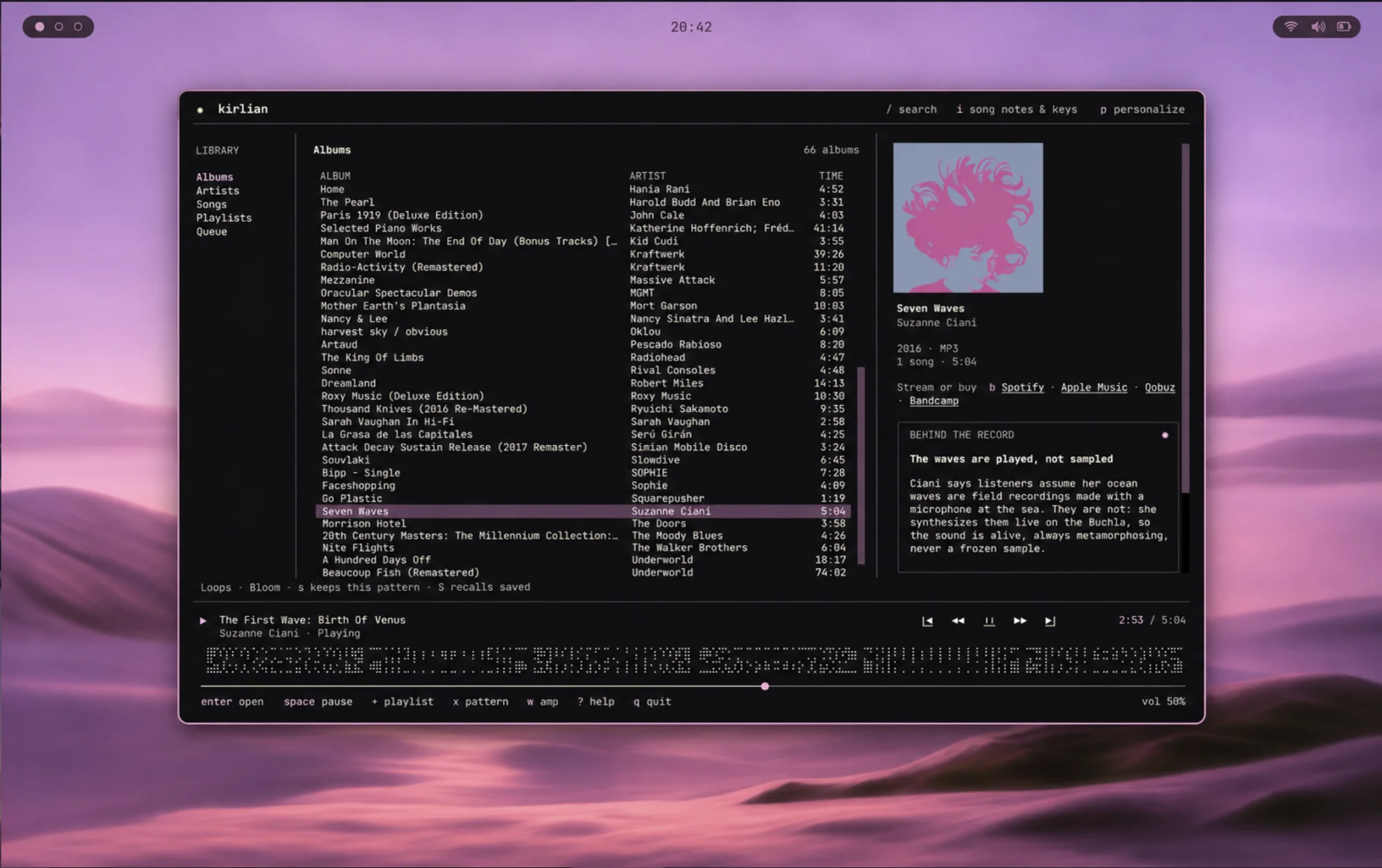
Built for albums
Choose your music folder on first launch, by path or in Finder. Albums appear while it indexes, grouped by tags and release folders, multi-disc sets in order, editions told apart by MusicBrainz release ID.
- Browse albums, artists, songs and playlists. / searches them all while the music plays.
- A search result starts its album at that song. a adds a song or album to the queue without interrupting.
- Save songs, albums or anything in the queue to a playlist with +. Reorder, rename and delete them; a missing file keeps its place, and deleting a playlist never touches your music.
- Quit mid-record and the next launch brings back your queue, paused at the same song and second. Your place is saved every few seconds, so it survives a crash too.
- b streams or buys the album: Spotify, Apple Music, Qobuz or a Bandcamp search.
- MP3, FLAC, M4A/AAC, Ogg Vorbis/Opus and WAV, played through mpv.
The filament ribbon
Three rows of fine Braille dots that move with the music, coloured from the playing album's cover. 180 patterns in 18 families, each answering a different part of the sound.
- As the song plays, the ribbon speeds up, brightens and flashes with levels measured from the audio.
- x draws a new pattern, s keeps it and S recalls the ones you kept.
- It is generated decoration, not a waveform.
- FilamentsMids lift the thread; treble adds strands
- TidesSwells rise with the bass
- BraidsLoud passages pull them apart
- RipplesEach hit pushes the rings outward
- OrbitsLoops widen with bass; hits nudge satellites
- FrondsLeaves reach further when loud
- MyceliumBranches reach further when loud
- EmbersMore sparks when loud; a burst on hits
- SeedsSwell with bass; turn with mids
- ConstellationsCymbals and treble make stars flare
- AuroraTreble lengthens the curtains
- RainLouder music brings heavier rain
- LoopsLoops widen when loud
- HeartbeatHits make the spikes jump
- CometsHits flare the heads
- LatticeThe bass widens the mesh
- PetalsFlowers open wider when loud
- DunesThe bass lifts the nearest range
Song notes
OptionalShort, sourced notes on the playing song and its album: what it is about, what a lyric refers to, how it came to be. Off until you turn them on with i.
- Each note is marked a Story, something a source states, or a Reading, an interpretation drawn from sources. It appears only if its source is a page the provider’s search actually retrieved; o opens it and [ ] bring more.
- Bring your own key for Anthropic, OpenAI, Exa, Perplexity or Parallel, with fallbacks in the order you set. Keys live in your system keychain.
- Only the title, artist, album, year and language are sent. Never audio, artwork, file paths or folder names.
- Answers are saved on your computer, so each song and album is asked about at most once per language.
Make it yours
Press p and preview every change while the music keeps playing. Try the palettes here: they recolour this page.
- Your own theme
kirlian --new-theme "Deep sea"writes a commented file with every colour the player uses. Share it by sending the file.- Motion
- Gentle, still or off
- Drawing
- Fine dots or plain ASCII
- Amp
- In the playbar or under the cover
- Language
- English · Español · Français · Deutsch · Italiano · Português (Brasil) · 日本語 · 한국어 · 简体中文
Every key
The whole player fits on one card. Typing in a field never triggers a shortcut, and the playbar answers the pointer too.
- jk
- Move, or use the arrow keys
- EnterEsc
- Open or play · back
- Space
- Play / pause
- /
- Search, and pick a result while you type
- nN
- Next / previous song
- HL
- Back / forward five seconds
- -=
- Volume
- a+
- Append to the queue · add to a playlist
- wE
- Show the amp · sound settings
- xsS
- New ribbon pattern · keep it · recall kept ones
- c
- Covers: terminal graphics or blocks
- p
- Personalize
- i[]o
- Song notes · more notes · open a note's source
- b
- Stream or buy the album
- fr
- Choose folder · rescan
- ?q
- All keys · quit
One line to install.
curl -fsSL https://github.com/lubizart1/Kirlian-terminal/releases/latest/download/install.sh | sh- macOS and Linux
- Sets up uv, and mpv on macOS
- Checks the published checksum
- Never uses sudo
Then run kirlian. On Linux the installer prints the command to install mpv.
Run the installer again to update; uv tool uninstall kirlian-terminal removes it.
Still being checked
- Audio quality and gapless transitions need a careful listening check.
- Song notes were checked live with Anthropic; the other providers against their documented formats.
- The translations were written with AI help and await native-speaker review.
Reports from other setups are welcome on GitHub.